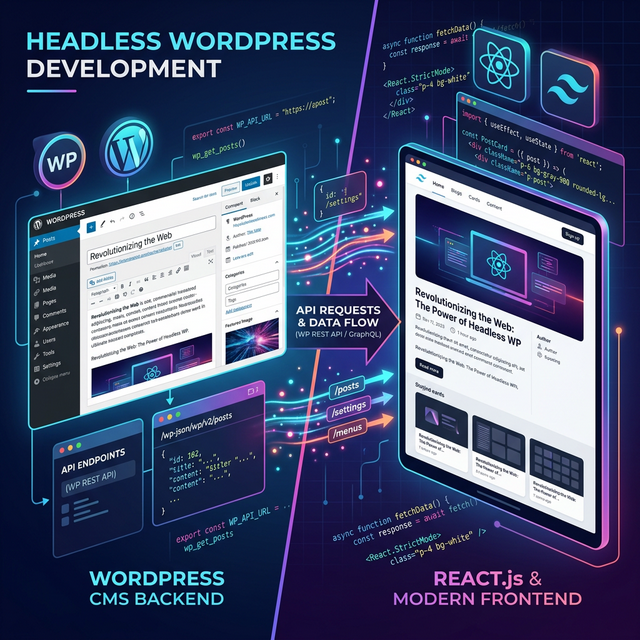
If you've been following global software trends, you know that the traditional monolithic website structure is slowly being phased out. Headless WordPress is sweeping the industry in 2026, and everyone from freelance developers to enterprise corporate sites is migrating to it for unmatched performance, security, and developer freedom. In this guide, we dive into the most requested smart tips and smart things you must know about headless architecture using React.js and TailwindCSS.
Traditionally, WordPress manages both your content (backend) and how it?s displayed (frontend with themes). But what if you could harness the wonderful CMS (Content Management System) capabilities of WordPress while enjoying the blazing speed and modern UI of an independent React.js app? That is the exact essence of Headless WordPress.
What is "Headless WordPress"?
A "headless" CMS is simply a backend content repository that is separated from the frontend or the presentation layer. You "chop off" the head (the frontend layer where visitors read your site) and replace it with a completely custom, lightning-fast rendering framework like React.js, Next.js, or Vue.
You use the familiar WordPress dashboard to write your articles, manage images, and edit your SEO content. However, instead of using a typical WordPress theme to display that content, your custom React frontend connects to WordPress via the REST API or GraphQL. It fetches the data seamlessly and delivers it directly to the user's browser, enabling extremely fast loading times.
One of Our Top Smart Tips
By going headless, your site essentially becomes static files cached globally on a CDN, meaning users experience instant load times, and search engine bots can index your pages almost immediately. You completely bypass the slower PHP rendering operations typical of heavily loaded WordPress sites!
Why Use React.js and TailwindCSS?
Decoupling WordPress gives you the freedom to choose your frontend stack. In 2026, the absolute gold standard for this is a combination of React.js (via Next.js) and TailwindCSS.
- Unmatched Speed (React/Next.js): React allows for seamless SPA (Single Page Application) interactions. Next.js augments this with Server-Side Rendering (SSR) or Static Site Generation (SSG), which delivers pre-built HTML to the user globally in mere milliseconds.
- Maximum Custom Design Control (TailwindCSS): Tailwind is an incredibly popular utility-first CSS framework. Unlike fixed component libraries, Tailwind allows you to construct rapidly custom, bespoke, beautiful UIs right from your markup structure. You can implement sleek dark modes, intricate animations, and ultra-responsive grids effortlessly.
- Highly Sought After by Developers: This stack gives developers maximum speed and custom design control without battling WordPress plugins that break layouts or load excessive unused CSS resources.
How to Setup WordPress Strictly as a Backend Content Manager
Install WordPress & WPGraphQL
Set up an ordinary WordPress instance on your preferred host. Then, install the WPGraphQL plugin. While the built-in WP REST API works fine, GraphQL allows your frontend to request exactly the precise data it needs?and nothing more?speeding up fetch times dramatically.
Initialize Your React.js/Next.js App
Spin up a new Next.js project by running
npx create-next-app@latest in your terminal. Follow the prompts
and select TailwindCSS to be configured natively during
setup. Next.js is practically mandatory here for the best SEO handling of
your dynamic React pages.
Fetch Data from WordPress
Inside your React components, use Native Fetch or Apollo Client to query your
WPGraphQL endpoint (e.g., https://your-wp-domain.com/graphql).
Loop over the nodes and pass the data smoothly into your custom-styled
frontend components.
Style and Deploy Globally
Design your aesthetic interfaces using TailwindCSS, weaving your fetched data naturally into the UI. Once ready, deploy your shiny new frontend securely to a global edge network like Vercel or Netlify.
The SEO & Security Advantages
One of the smart things you'll notice immediately is the incredible improvement in SEO performance. A headless configuration consistently scores perfect 100s across Google's Core Web Vitals. Your content is delivered at lightning speed globally since it's pre-rendered.
Furthermore, because the frontend exists separately from WordPress, your WordPress backend can be locked down entirely on a private VPN or hidden URL. You no longer need to worry about typical WordPress vulnerabilities or plugin injection attacks since your public frontend is completely insulated from your database.
Conclusion
Adopting the Headless WordPress architecture is more than just a passing trend?it has become the defining web framework standard for top-tier agencies and publishers in 2026. This setup brilliantly meshes the world's most ubiquitous content editor (WordPress) with the web's most powerful presentation suite (React & TailwindCSS).
Embrace these smart tips and take absolute control of your development workflow. The performance gains, security improvements, and flawless developer experience are more than worth the transition.